
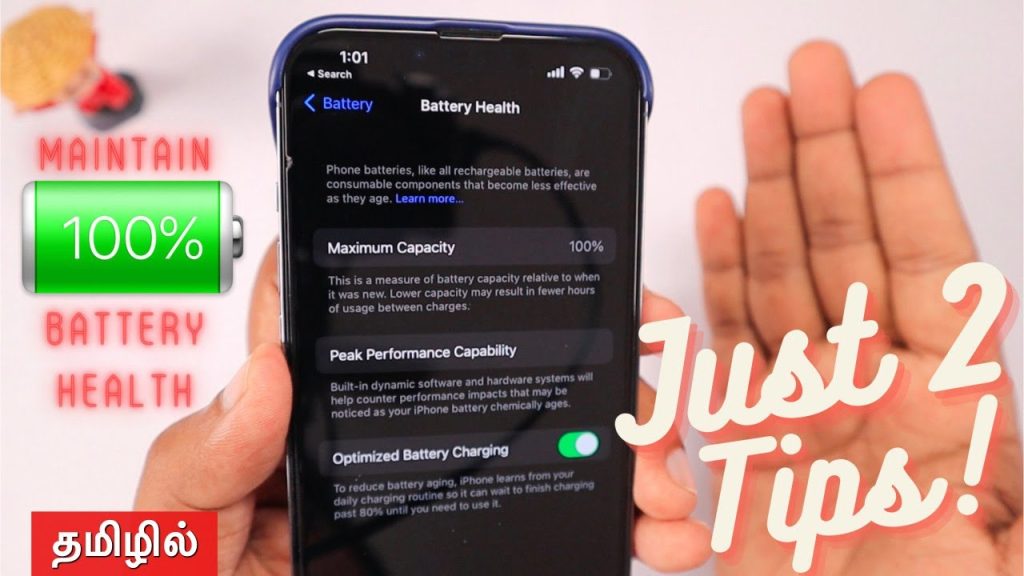
Let’s be honest. That little “Battery Health” percentage in your iPhone settings can feel like a countdown timer to an expensive replacement. You know the feeling—the slight panic when it dips below 90%, the frantic Googling for tips. But what if you could stop worrying and just… understand it?
Here’s the deal: your iPhone battery is a consumable part, like tires on a car. It will wear out. But with some know-how, you can dramatically slow that process. This isn’t about paranoid rituals; it’s about smart, sustainable habits that preserve your battery’s health for the long haul.
What “Battery Health” Actually Means (It’s Not What You Think)
First off, let’s demystify that percentage. It represents your battery’s maximum capacity relative to when it was new. A 95% rating means your fully charged battery can hold 95% of the energy it could on day one. The phone uses this to estimate performance and, eventually, may enable performance management features.
The real villain here is the chemical age of the battery. Two main factors drive aging: charge cycles and stress. Every full 100% discharge counts as one cycle. Stress? That comes from heat and, ironically, from keeping your phone plugged in all the time at 100%.
The Heat Factor: Your Battery’s Worst Enemy
Think of heat like kryptonite for lithium-ion batteries. Seriously. Leaving your phone on a dashboard in the sun, gaming for hours, or using a cheap, non-certified charger—these all cook the delicate chemistry inside. You might even feel the warmth in your hand. That’s a sign it’s degrading faster.
Practical, No-Stress Optimization Habits
Okay, enough theory. Let’s get into the actionable stuff—the habits that make a real difference without turning you into a battery babysitter.
1. The Charging Sweet Spot (Forget the Old Myths)
Old advice said to drain your battery to 0% before charging. That’s terrible for modern batteries! The ideal range? Apple itself suggests keeping it between 20% and 80% most of the time. You don’t need to be perfect, but think of it like this: keeping your battery in the middle of its range is less stressful than pushing it to the extremes.
And overnight charging? With Optimized Battery Charging enabled (Settings > Battery > Battery Health), your iPhone learns your routine and waits to finish charging past 80% until you need it. It’s a brilliant, set-it-and-forget-it feature. Make sure it’s on.
2. Be Smart About Accessories & Settings
Not all chargers are created equal. Always use MFi (Made for iPhone) certified cables and chargers. Those sketchy gas station chargers can cause voltage spikes that stress the battery. For a real preservation boost, consider a slower 5W charger for overnight use instead of a fast charger every time—fast charging generates more heat.
On the software side, a few tweaks help:
- Background App Refresh: Go to Settings > General > Background App Refresh and set it to “Wi-Fi” or off for apps that don’t need it.
- Location Services: Review which apps have “Always” access (Settings > Privacy & Security > Location Services). Change non-essential ones to “While Using.”
- Auto-Brightness: Let your phone manage it (Settings > Accessibility > Display & Text Size). It saves power and reduces heat.
Debunking Common Battery Preservation Myths
Let’s clear the air on some persistent folklore. You know, the stuff your uncle swears by.
| Myth | Reality | The Takeaway |
| You must always close your apps to save battery. | Constantly force-quitting apps can actually use more battery, as the OS has to reload them from scratch. | Only close apps if they’re frozen. Let iOS manage memory. |
| Never use your phone while it’s charging. | Using it for light tasks is fine. Just avoid intensive, heat-generating activities like gaming or video editing. | It’s the heat from combined workloads, not the act of using it, that’s the issue. |
| Turning your phone off regularly helps. | A weekly restart can clear glitches, but powering off daily has negligible impact on long-term battery health. | Don’t bother with a daily shutdown ritual. |
When to Worry (And When to Just Relax)
So your battery health is at 87%. Is that bad? Well, not necessarily. Apple considers a battery consumed—and eligible for replacement—when it hits 80% maximum capacity under warranty. But a battery at 80% can still get you through a day if your habits are good.
You should consider a replacement if:
- Your phone shuts down unexpectedly at 20% or 30% charge.
- You must charge it two or more times in a single day with normal use.
- Performance is noticeably sluggish, and your battery health is below 80%.
Otherwise? Try to let go of the percentage obsession. It’s a tool, not a grade. Batteries are meant to be used—enjoy your phone.
The Long Game: A Thought on Sustainability
In the end, optimizing your iPhone’s battery health isn’t just about avoiding a $89 replacement fee. It’s a small act of digital stewardship. By making these subtle shifts—charging mindfully, managing heat, ignoring myths—you extend the life of your device. You keep it out of a drawer or a recycling bin for another year, maybe two.
That’s a win for your wallet and, honestly, for the planet. Your phone is a powerful tool. With a little care, you ensure it has the energy to keep up with you, for all the years to come.



More Stories
iPhone Accessibility Features for Neurodivergent Users: A Practical Guide (2025 Edition)
Privacy-first iPhone photography workflow
Retro Gaming and Emulation on Modern iPhones: Setups and Legal Considerations