
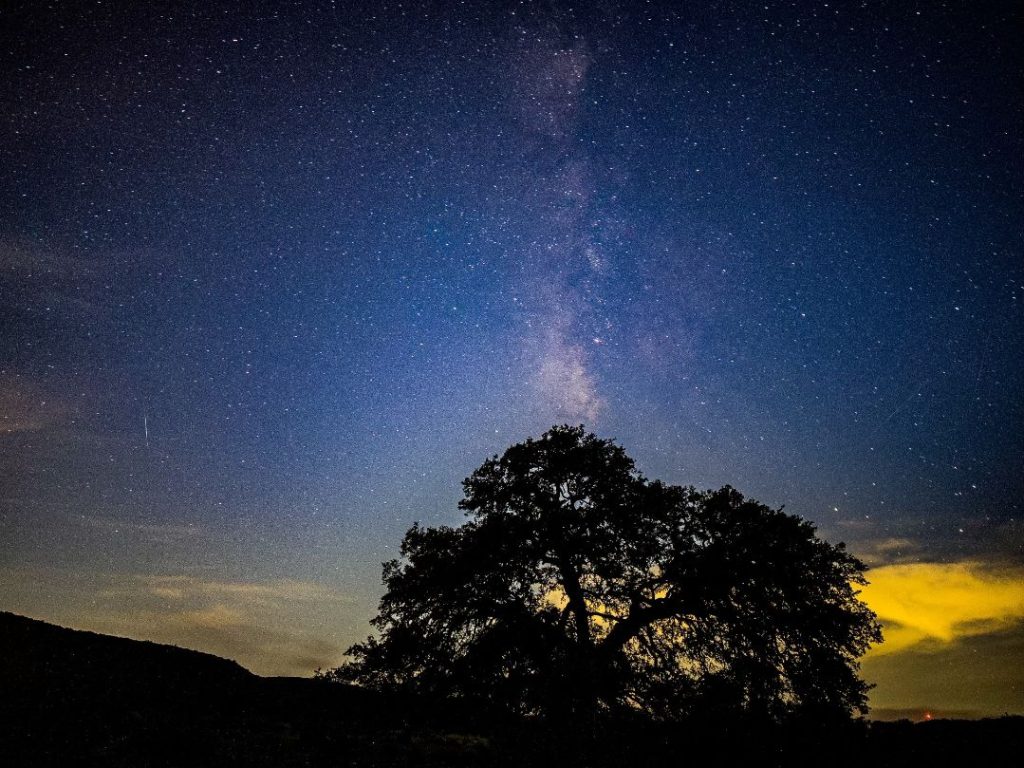
Your iPhone is more than a phone. It’s a camera that fits in your pocket, capable of capturing everything from the dust on a butterfly’s wing to the dust of a million stars. Honestly, the hardware is so good now that the real magic happens when you learn to see like a photographer.
Let’s ditch the generic snapshots and dive deep into three challenging, rewarding genres: astrophotography, macro, and street photography. Each has its own rhythm, its own rules to learn and then, you know, maybe break. Here’s the deal on how to master them.
iPhone Astrophotography: Painting with Starlight
Astrophotography used to require thousands in gear. Now? Your iPhone can do it. The key is understanding that you’re collecting faint light—and fighting light pollution. It’s a patient game.
The Non-Negotiable Setup
First, you absolutely need a tripod. Any shake ruins a long exposure. A Bluetooth shutter remote or using your Apple Watch as a shutter helps, but the timer works in a pinch.
Next, location. Get out of the city. Use apps like PhotoPills or Dark Sky Finder to scout for true darkness. The moon is your enemy for deep-sky shots; aim for a new moon phase. And check the weather. Clear, transparent skies are everything.
Night Mode & Pro Settings: Your Secret Weapons
On recent iPhones, Night Mode kicks in automatically in low light. But you can’t just point and shoot. Here’s the workflow:
- Mount your phone, frame your shot (often aiming at the Milky Way core in the southern sky).
- Tap to focus on a bright star or distant light—then slide the focus slider to manual, locking it.
- Now, slide the Night Mode exposure timer to “Max” (up to 30 seconds). The phone will do the rest, stacking images to reduce noise.
For even more control, use a third-party app like Halide or ProCamera. These let you manually set a long exposure (start with 15-30 sec), ISO (keep it as low as possible, like 800-1600, to manage grain), and shutter speed. It’s a balancing act.
A quick tip? Include a sliver of land, a silhouette of a tree, a person. It gives the cosmic scale a sense of place, of awe. Without it, the shot can feel… ungrounded.
iPhone Macro Photography: The World in a Dewdrop
Macro is about revealing the hidden universe right under our noses. Since the iPhone 13 Pro, we’ve had a dedicated macro lens. It’s a game-changer, but it has quirks.
Mastering the Native Macro Lens
The ultra-wide camera doubles as the macro lens. It automatically switches when you get close—about 2 inches away. That’s really close. The challenge? Lighting and stability.
At that distance, your shadow blocks the light. And any hand tremor is magnified. So:
- Use diffused, natural light. A cloudy day is a macro photographer’s best friend. Harsh sun creates wild, distracting shadows.
- Steady yourself. Brace your arms against your body, or use a mini tripod. Even leaning the phone on a book helps.
- Manual focus is key. Tap on your screen to focus on the most critical detail—the eye of an insect, the stamen of a flower. The depth of field is razor-thin.
Composition & Creativity in the Tiny Realm
Don’t just center the subject. Use the rule of thirds. Make a dewdrop reflect an entire tree. Look for patterns, textures, colors that tell a tiny story.
Water droplets, insect wings, the texture of a leaf… these are your landscapes. A slight breeze is your nemesis. Sometimes you just have to… wait. Patience isn’t just a virtue here; it’s the whole technique.
And if you have an older iPhone, don’t sweat it. Clip-on macro lenses from brands like Moment can unlock this world for you too. They’re a fantastic, low-cost entry point.
iPhone Street Photography: Capturing the Decisive Moment
Street photography is the art of the fleeting. It’s chaotic, human, and unpredictable. Your iPhone is perfect for it—it’s discreet, fast, and always ready.
Mindset & Anticipation Over Gear
Forget fancy settings for a second. The core skill is anticipation. Seeing a moment before it happens. Look for interesting light—a shaft of sun between buildings, a long shadow. Find a compelling background—a vibrant wall, a geometric pattern—and wait for a subject to enter the frame.
Shoot from the hip, literally. Use your volume buttons as a shutter. Keep your phone at your side, screen off, and when you see something, just raise and shoot. It’s less intrusive. People often don’t even notice.
Technical Tweaks for Speed
Enable “Prioritize Faster Shooting” in your Camera settings. This helps capture that split-second moment. Use Burst mode (hold the shutter) when action is unfolding.
For exposure, lock it. Touch and hold on your screen until you see “AE/AF Lock.” This stops the camera from constantly re-adjusting as you recompose, which is crucial in dappled light or high-contrast scenes.
And honestly, shoot in Live Photo mode. You can later pick the best frame from the sequence, or choose a different key photo. It’s a safety net for the perfect expression or gesture.
Genre-Blending & The Editing Touch
The lines blur, and that’s where it gets fun. A street photo at night with stars in the background? That’s astro-street. A macro detail of weathered paint on a street sign? See what I mean?
No matter the genre, editing is where you finalize your vision. Use the Photos app for basic tweaks, but for real control, embrace apps like:
- Lightroom Mobile: For precise color grading and detail recovery, especially in astro shots.
- VSCO: For beautiful, nuanced filmic presets that work wonders on street scenes.
- Photomator: Incredibly powerful for local adjustments and macro detail enhancement.
The rule? Edit to enhance the mood you felt when you took the shot, not to create a new reality. Pull back the shadows in a street scene to reveal a face, yes. But maybe leave the astro shot a little dark and mysterious—it’s space, after all.
In the end, mastering these genres isn’t about ticking technical boxes. It’s about learning to see the world in three different ways: the vast, the minute, and the candidly human. Your iPhone is just the tool. The vision? That’s all you. So go out and collect some light—in all its forms.

More Stories
Offline Navigation and Maps with iPhone: Your Pocket Compass When the Signal Dies
iPhone Accessibility Features for Neurodivergent Users: A Practical Guide (2025 Edition)
Privacy-first iPhone photography workflow