
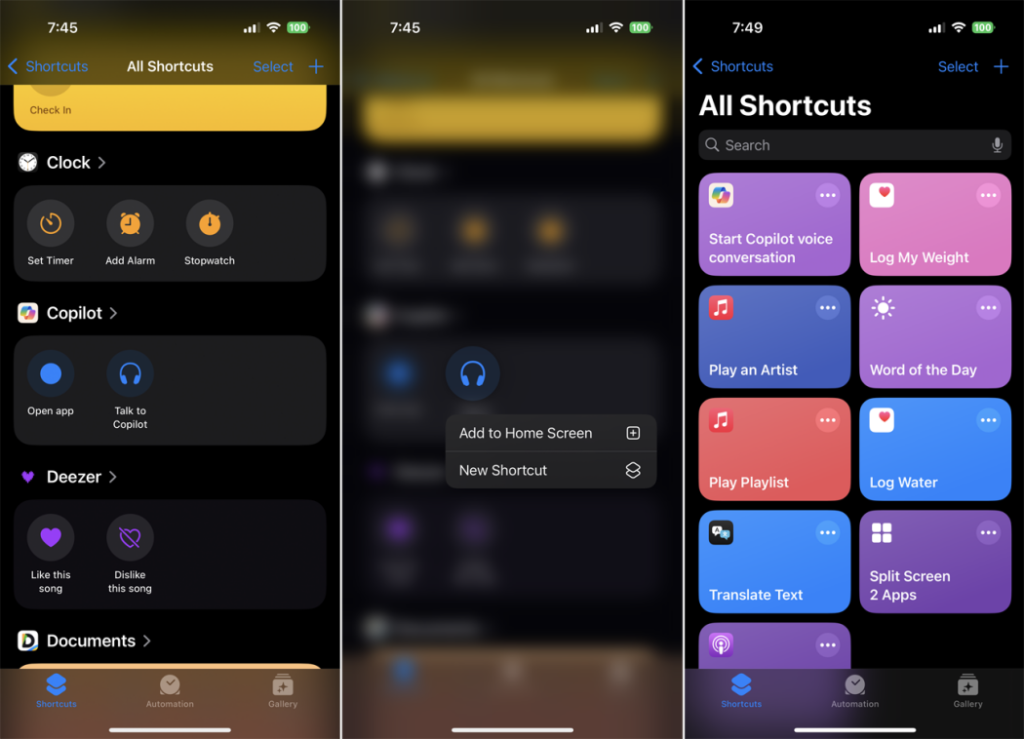
Let’s be honest. Most of us use our iPhones like digital Swiss Army knives—handy for a dozen different tasks, but rarely unlocking their true, transformative potential. We tap, we swipe, we manually adjust. But what if your phone could anticipate? What if it could weave together your digital tasks and physical environment into one seamless experience?
That’s the promise of advanced iPhone automation. We’re moving past simple morning alarms. We’re talking about a phone that quiets your house as you start a Zoom call, texts your ETA home when you leave the office, and even guides your focus based on your calendar. It sounds like sci-fi, but it’s all possible right now. Here’s how to make it work for you.
The Engine Room: Shortcuts and Focus Modes, Reimagined
The magic happens in two places: the Shortcuts app and Focus modes. Think of Shortcuts as the builder’s workshop. You can construct incredibly detailed workflows—called automations—that chain together actions across apps and devices. Focus modes are like the conductors, changing the rules of your digital world based on what you’re doing.
Crafting Intelligent Personal Automations
Personal automations are triggered by you—or rather, by context. Time of day, location, app usage, even connecting to a specific Wi-Fi network. The key is to start with a pain point. That daily friction you barely notice anymore.
For example, a “Deep Work Launch” automation. It could trigger when a “Work” Focus mode turns on. The automation could then:
- Set a volume limit on your AirPods to protect your hearing.
- Open your project management app (like Things or Notion) to today’s list.
- Send a pre-written “in focus mode” reply to your messaging app of choice.
- And, crucially, log the start time in a note for time-tracking.
One trigger. Four coordinated actions. You’ve just saved mental energy and built a ritual.
The Unsung Hero: Focus Filters
This is where it gets really clever. Focus Filters let your Focus mode change the view inside specific apps. When “Work” mode is on, your Calendar could only show work meetings. Your Safari browser could default to a professional bookmarks folder. Mail could hide your personal inbox.
It’s not just blocking distractions; it’s actively reshaping your digital tools for the task at hand. It’s a subtle but profound shift from defense to offense.
Your iPhone as the Brain of Your Smart Home
This is where the lines between productivity and lifestyle truly blur. Your iPhone’s location, its status, your habits—they can all become invisible commands for your home.
Let’s dive into a classic: the “Coming Home” scene. Sure, you can tap a button. But an advanced automation uses geofencing or when your phone connects to CarPlay. It can:
- Text your housemates or family your ETA (using Maps to get travel time).
- Turn on specific lights and adjust the thermostat.
- Play a “welcome home” playlist on your HomePod.
- Even announce on your HomePod, “Dad’s five minutes away,” if you have kids.
The “Leaving Home” trigger is just as powerful. It can run a security checklist: lock all doors, close the garage, turn off all lights, and set cameras to “Away” mode. Peace of mind, automated.
Pro-Level Integrations: The Real Game Changers
Here are a few less-obvious automations that feel like pure magic:
| Trigger | Action | Why It’s Brilliant |
| When your “Sleep” Focus starts | Lock your smart lock, set hallway lights to 5% (nightlight mode), turn off the TV via HomeKit, and start a white noise soundscape. | It builds a bedtime fortress without a single thought. |
| When you start a video call on your Mac | Pause any music playing on HomePods, and set the living room lights to a brighter, more flattering level. | Professionalism, automated. It handles the awkward “hold on, let me turn off the music” moment. |
| When the last person leaves (using HomeKit presence sensing) | Run a robot vacuum, set the thermostat to an eco-friendly temperature, and enable security cameras. | Your home maintains and protects itself when empty. |
Overcoming the Hurdles: Making Automation Reliable
Okay, so it’s not all perfect. You’ve probably hit the big limitation: many advanced automations require a confirmation tap to run. That defeats the purpose, right? Well, here’s the deal—there are workarounds.
Using a Focus mode change as a trigger often bypasses the confirmation. So, instead of triggering “Evening Scene” at 7 PM (which asks for confirmation), trigger it when your “Evening” Focus mode turns on at 7 PM. It’s a sleight of hand that makes everything feel seamless.
Another trick? Use a simple NFC sticker. Tap your phone to a sticker by the door, and it can run any automation, no questions asked. It’s a physical trigger for a digital action—and honestly, it still feels like wizardry.
The Philosophy of a Automated Life
This isn’t about laziness. It’s about cognitive offloading. Every decision your phone handles automatically is a decision your brain doesn’t have to make. It’s mental RAM that gets freed up. The goal isn’t to remove yourself from the equation, but to remove the friction that stands between you and what you actually want to do—whether that’s deep work, relaxation, or connection.
Start small. Fix one tiny annoyance. Then, link two actions together. Before you know it, you’ll have built a personal operating system that works in the background, a silent partner tuned to the rhythm of your life. The technology is already in your pocket. The only question is, what will you stop doing manually today?


More Stories
Mastering iPhone Photography Genres: Astrophotography, Macro, and Street Photography Techniques
iPhone Battery Health: The Real Guide to Keeping Your Power Going Strong
Your iPhone’s Secret Superpower: A Parent’s Guide to Controls and Safety