
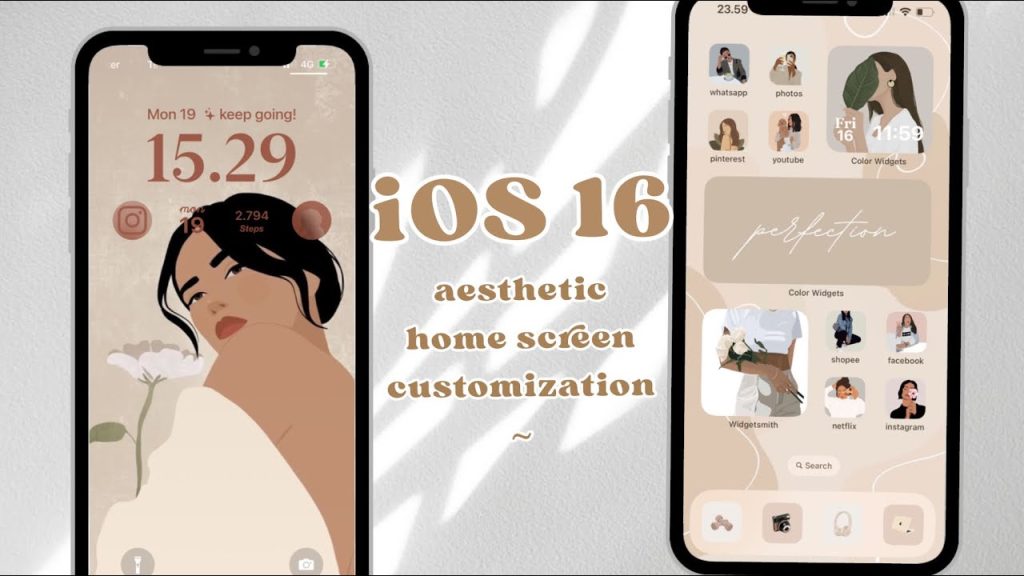
Let’s be honest. When Apple finally gave us widgets on the home screen, it felt like a revolution. We spent weeks arranging them, stacking them, trying to find that perfect balance of form and function. But here’s the deal: that was just the beginning. The real, deep customization of your iPhone’s home screen has moved into subtler, more creative territory. It’s less about the obvious widgets now and more about personal expression and clever utility.
If you’re ready to move past the basics, let’s dive into the trends that are quietly reshaping how iPhone users think about their most personal screen.
The Minimalist Aesthetic: Embracing the Blank Canvas
Ironically, one of the hottest trends involves removing things. It’s a reaction to digital clutter. The goal? A serene, focused home screen that feels more like a curated art piece than a control panel.
How are people achieving this? It’s a mix of tactics:
- Transparent Widgets & Icons: Using shortcuts to create app icons that match your wallpaper perfectly, making them virtually disappear.
- Strategic Blank Spaces: Leveraging “invisible” icons or widget stacks left empty to push actual apps into a clean, geometric arrangement—often just a single row at the bottom.
- Monochromatic Icon Packs: Ditching the rainbow of default app colors for a unified palette of whites, blacks, or pastels. It’s visually calming, you know?
This trend isn’t just about looks. It’s a deliberate choice to reduce visual noise and decision fatigue every time you unlock your phone. The home screen becomes a statement of intentionality.
Advanced Shortcuts Automation: The Invisible Engine
Okay, this is where the magic happens. Widgets sit on the surface, but iOS Shortcuts automation is the powerful engine running underneath. The trend is moving from single-tap shortcuts to complex, context-aware automations that change your home screen’s behavior.
Think about it. Your phone can now automatically:
- Switch to a “Work” focus with a specific app layout when you arrive at the office.
- Show a bedtime-themed screen with dimmed widgets and a meditation app front-and-center at 10 PM.
- Present a “Travel” page with boarding pass shortcuts, translation apps, and a currency converter when it detects you’re at an airport.
These automations create a dynamic home screen experience that adapts to your life. The customization isn’t static; it’s a living thing. And the best part? It’s all built-in, no jailbreak required.
Hyper-Personalized Iconography & Typography
Gone are the days of just accepting the candy-colored Mail icon. The push for truly personal icon sets is massive. People are using the Shortcuts app to replace every single icon with something that fits a theme—retro neon, hand-drawn sketches, sleek glassmorphism designs.
But there’s a catch, right? The shortcut “jump” animation. Savvy customizers have turned this limitation into a feature by using it for functional categorization. For instance, all social media apps might have a slight fade-in, while productivity apps use a different transition. It’s a subtle, almost subliminal way to organize.
Typography is joining the party, too. With custom widget apps, you can place elegant, oversized date and time displays or inspirational quotes in your favorite font directly on the home screen, treating it more like a lock screen or even a poster.
The “App-Less” Home Screen & Spotlight as a Launcher
This is a power-user trend that’s gaining steam. The idea is to have zero app icons on your main home screen page. Instead, you rely entirely on:
- Spotlight Search (Swipe Down): Honestly, it’s faster to swipe down and type “spo” for Spotify than to hunt for an icon.
- Back Tap & Action Menus: Configuring double- or triple-taps on the back of your iPhone to open favorite apps or trigger shortcuts.
- The App Library: Embracing the automatic, categorized list on your far-right screen.
This creates a fantastically minimalist look and, surprisingly, can boost productivity by reducing mindless app grazing. Your home screen becomes a beautiful wallpaper, a few key widgets for information, and nothing else. It’s a bold move.
Data-Driven Widgets & Informational Dashboards
Sure, we have widgets. But the trend is shifting from simple app launchers to consolidated, data-rich dashboards. People are building single widgets that pull from multiple sources.
Imagine one widget that shows:
| Top Left: | Today’s calendar events |
| Top Right: | Live crypto portfolio value |
| Bottom Left: | Step count & ring closure |
| Bottom Right: | Current music playing |
This requires advanced shortcut scripting and third-party apps like Scriptable, but the result is a hyper-efficient, at-a-glance command center. It’s the ultimate expression of the iOS home screen as a productivity hub.
Nostalgia & Thematic Immersion
Fun is a valid customization goal. A huge trend is building home screens that transport you. Think complete retro gaming console themes (like a Game Boy Color), complete with pixel-perfect icons and a matching wallpaper. Or a theme based on your favorite movie, album, or aesthetic—cottagecore, cyberpunk, you name it.
This goes beyond icons. It’s about matching sounds (using custom shortcut actions), widget styles, and even your Apple Watch face to create a fully immersive digital environment. It’s playful, deeply personal, and a reminder that your phone should spark joy, too.
Where is This All Heading?
Well, the throughline is clear: control. Users are taking the building blocks Apple provides and bending them into shapes that fit their unique mental models and lifestyles. The future of iOS home screen personalization isn’t about waiting for Apple to add features; it’s about combining existing tools in inventive ways.
The barrier is no longer technical, it’s creative. And that’s the most exciting trend of all. Your home screen is no longer just a launchpad. It’s a dashboard, a painting, a time machine, or a zen garden. It’s whatever you need it to be, hidden in plain sight.


More Stories
Building iOS Apps for Specialized Professional Workflows (e.g., Healthcare, Field Service)
Creating localized iOS experiences for specific global regions and cultures
Optimizing iOS App Performance for Emerging Foldable iPhone Form Factors