
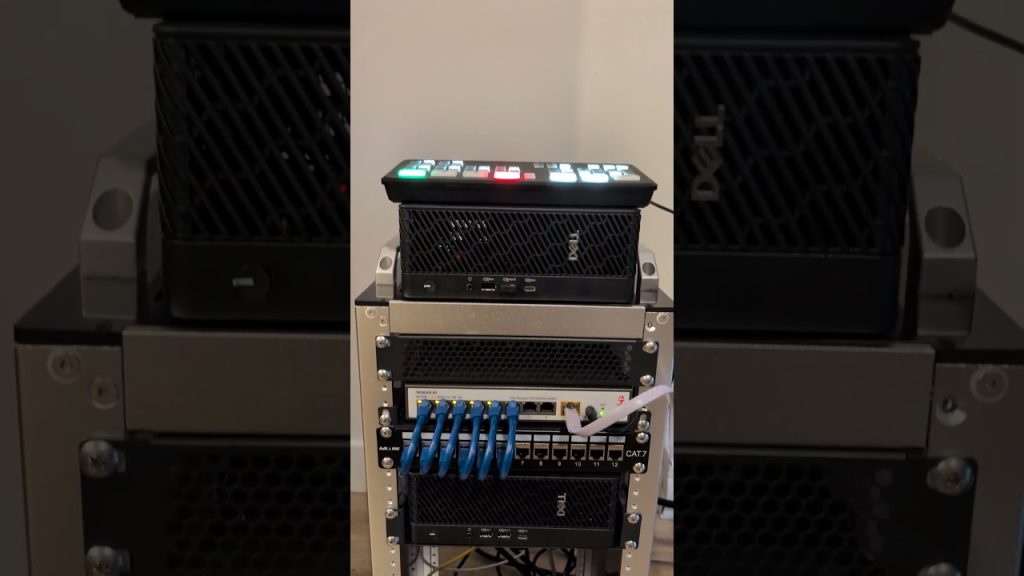
Let’s be honest. The dream of a powerful, do-it-all home server setup—a homelab—can run headfirst into the brutal reality of consumer hardware prices. You know the feeling. You’re looking at a tiny NAS or a mini-PC, and you just think… “That’s it?” The specs feel anemic, the upgrade path is a dead end, and the idea of running a dozen virtual machines or a true enterprise application seems laughable.
Here’s the deal: there’s a secret, far more powerful path. It’s the world of decommissioned enterprise hardware. Servers and networking gear that once powered Fortune 500 companies, now retired and available for a fraction of their original cost. It’s not without its quirks, but building a homelab with this gear is like getting a Formula 1 engine for the price of a used sedan. Let’s dive in.
Why Go the Retired Enterprise Route?
Well, for starters, raw capability. We’re talking about machines designed to run 24/7 for years, packed with features most consumer boards never dream of. Multiple CPU sockets, vast amounts of RAM slots, hardware RAID controllers, and remote management tools (like iDRAC, iLO, or IPMI) that let you control the server from your laptop as if you were sitting in front of it.
The value proposition is, frankly, insane. You can pick up a Dell PowerEdge R720 or an HP ProLiant DL380p Gen8—machines that were $5,000+ beasts—for a few hundred dollars. That gets you a dual-socket system capable of handling 128GB of RAM or more, a dozen drive bays, and that enterprise-grade reliability. It’s the ultimate budget homelab server foundation.
The Not-So-Fine Print: The Tradeoffs
Okay, it’s not all rainbows. This hardware comes with… character. Primarily, noise and power consumption. A 1U rack server sounds like a jet engine taking off at boot. It’ll settle, but it won’t be library-quiet. And these machines are built for performance and redundancy, not winning any green awards. Your electricity bill will see a noticeable bump.
That said, you can mitigate this. Look for slightly newer generations (like Dell’s 13th gen or HP’s Gen9). They’re often more efficient. Or, consider tower servers (like the Dell T630) which are designed for slightly kinder acoustics. It’s a balancing act between raw power and domestic harmony.
Where to Hunt for Your Homelab Hardware
You’re not buying this stuff on Amazon. The market for used server equipment is a niche ecosystem. Here are your main hunting grounds:
- eBay: The king of the hill. Search for specific models. Look for sellers with high ratings who specialize in IT gear. They often test the equipment and offer short warranties.
- Local Electronics Recyclers: A treasure trove. Companies pay to dispose of old gear, and these recyclers resell it. You can sometimes inspect in person and find unbelievable deals.
- Business Liquidation Sales: Keep an eye on local auctions or online marketplaces when a business shuts down or upgrades.
What to Actually Look For (A Starter Checklist)
Diving in blind is a recipe for frustration. Have a plan. When evaluating a potential server, prioritize these components:
| Component | What to Look For & Why |
| CPU(s) | Go for at least 8 cores total. Intel Xeon E5-2600 v2/v3 series are the sweet spot for price/performance. More cores = more VMs. |
| RAM | ECC DDR3 is cheap. Aim for 64GB minimum. Check the max the motherboard supports for future growth. |
| Drive Bays & RAID | Do you want 8 bays? 12? More? Ensure it has a RAID card (like a PERC H710). It manages your drives. |
| Remote Management | This is non-negotiable. Must have iDRAC (Dell) or iLO (HP) with an enterprise license. It’s your lifeline. |
| Power Supplies | Dual, redundant PSUs are standard. They add to power draw but are fantastic for reliability. |
Building Your Lab: More Than Just a Server
A server is the heart, but your homelab needs a nervous system. That’s the networking gear. And guess what? You can get used enterprise networking equipment too. A managed gigabit switch from Cisco or Ubiquiti lets you create VLANs—separating your smart home gadgets from your media server from your development VMs. It’s a security and organization game-changer.
And storage? Don’t just rely on the server’s internal bays. With a proper switch, you can build a dedicated NAS using something like TrueNAS Core on older hardware, serving storage over the network to your main server. It starts to feel less like a hobby and more like a real, scalable data center… in your closet.
The Software Side: Making It Sing
The hardware is just inert metal without software. The beauty of a powerful homelab is the playground it creates. You’ll likely want a type 1 hypervisor—that’s the software that lets you run virtual machines directly on the bare metal. The big three are:
- VMware vSphere/ESXi: The industry standard. Has a free version with limitations. Great for learning the tech used everywhere.
- Proxmox VE: The open-source darling. Incredibly powerful, integrates containers (LXC) and VMs, and has no licensing fees. A fantastic starting point.
- Microsoft Hyper-V: Solid if you’re deeply invested in the Windows ecosystem.
On top of this, you can host *everything*. A media server (Plex/Jellyfin), home automation (Home Assistant), game servers, web servers, a personal cloud (Nextcloud), and security tools. You can break things, rebuild them, and learn by doing—which is the whole point.
A Realistic First Project Path
Feeling overwhelmed? Don’t be. Here’s a sensible, step-by-step approach to avoid that “what have I done” panic:
- Acquire Your Foundation: Find a Dell R720 or HP DL380p Gen8 with decent specs.
- Set Up the Hypervisor: Install Proxmox on it. Get one VM running. Any VM.
- Conquer Remote Management: Log into iDRAC/iLO. Learn how to mount an ISO and install an OS remotely. This feels like magic.
- Build Your First Service: Deploy a Ubuntu Server VM and install Docker. Then, use Docker Compose to spin up a simple service—like a WireGuard VPN or a Pi-hole ad blocker.
- Expand Gradually: Add another service each week. Before you know it, you’ll be architecting a whole private cloud.
The True Reward Isn’t Just the Hardware
Sure, having a petabyte of storage for your movie collection is cool. But the real value of a homelab built on retired enterprise gear is intangible. It’s the hands-on, unfiltered experience with systems that power the internet. You’ll gain a deep, practical understanding of networking, virtualization, storage, and security that’s incredibly valuable—whether you’re looking to advance your IT career or just master your own digital domain.
It’s a tinkerer’s paradise with real stakes. When your home network goes down, you’re the one who gets to fix it. And in that process, you learn. You solve. You build resilience, not just in your hardware, but in your own skills. That’s the ultimate upgrade.
More Stories
Open-Source Hardware Projects and DIY Electronics Kits: Building the Future, One Circuit at a Time
The Essential Guide to Open-Source Hardware Projects and Development Boards
Hardware Modifications for Retro Gaming Console Preservation