
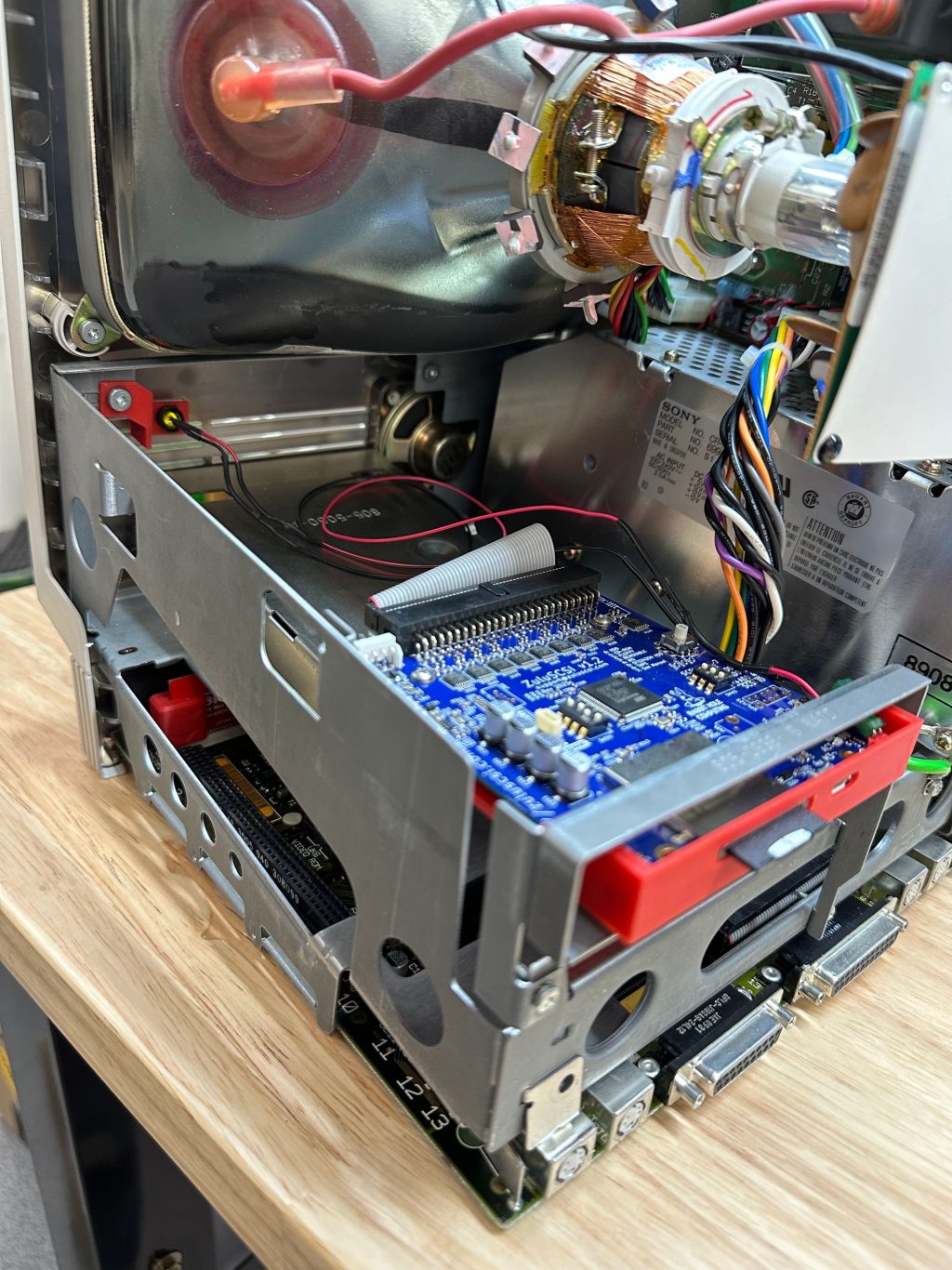
The whir of a floppy drive seeking. The soft, green glow of a monochrome CRT. The satisfying thock of a mechanical keyboard. For a growing community of enthusiasts, these aren’t just nostalgic sounds—they’re a call to action. Retro computing hardware restoration isn’t about hoarding relics in an attic. It’s a vibrant, hands-on hobby that blends preservation, engineering, and pure creativity.
Let’s dive in. Why are people spending weekends recapping motherboards and hunting for SCSI terminators? It’s part archaeology, part personal challenge. And honestly, it’s incredibly rewarding to breathe life back into a machine that was declared dead decades ago.
The Three Pillars of the Retro Hobby: Restore, Modify, Integrate
This whole scene really rests on three core ideas. You can stick to one or, more commonly, mix them all together in a wonderfully messy project.
1. Pure Restoration: The Path of the Purist
Here, the goal is authenticity. To bring a classic computer—say, an Apple II, a Commodore 64, or an early IBM PC—back to its original, factory-fresh state. This is meticulous work. It often starts with a deep clean, removing decades of dust and… well, sometimes worse. Then comes the real electronics work.
The biggest culprit in retro hardware failure is age-related component decay. Electrolytic capacitors dry out and leak. Batteries on old motherboards corrode. The restoration process involves:
- Recapping: Replacing every old capacitor on the board. This fixes a huge percentage of “dead” machines.
- Rust and Corrosion Removal: Carefully cleaning battery damage with vinegar and isopropyl alcohol.
- Replacing Failed Chips (ICs): Sourcing period-accurate chips or using modern, drop-in replacements.
- Cosmetic Refurbishment: Retrobrighting yellowed plastic, polishing cases, and finding original keycaps.
The purist’s joy is in hearing that original startup chime on a machine last booted in 1994. It’s a direct link to the past.
2. Modification and “Modding”: Bridging Eras
This is where things get really interesting. Modification accepts that the original hardware had limits—and seeks to smash them. The ethos here isn’t strictly preservation; it’s enhancement. We’re talking about giving old hardware capabilities its designers never dreamed of.
Common retro computing modifications include:
| Modification | What It Does | Example Hardware |
| Flash Storage Solutions | Replaces floppy or hard drives with SD cards or USB sticks. Faster, more reliable, and holds entire software libraries. | PiSCSI for Macs, GOTEK for Amiga/PC. |
| Modern Video Output | Adds HDMI, VGA, or component video out for use with modern monitors. | RGBtoHDMI for 8-bit micros, OSSC for consoles. |
| Memory Upgrades | Expands RAM beyond original specs using modern memory modules. | Accelerator cards for 68k Macs, RAM expansions for C64. |
| Network Connectivity | Adds Ethernet or Wi-Fi for transferring files or even basic web browsing. | WiFi modems for dial-up ports, Ethernet cards for old PCI slots. |
These mods aren’t cheating. They remove the friction of decaying media and obsolete connectors, letting you actually use the machine. It’s like restoring a classic car but adding electronic ignition for reliability—you still feel the original engine, but it starts every time.
3. Modern Usability: The Daily Driver Dream
This is the ultimate goal for many: making a retro computer a functional part of modern life. Can you actually get real work or play from a 30-year-old machine? Often, yes. Here’s the deal:
- Distraction-Free Writing: An old word processor on a monochrome display is a perfect focus tool. No notifications, no browser tabs.
- Retro Gaming & Demoscene: The original, intended use—but now with entire game libraries on an SD card. It’s a pure, unadulterated experience.
- Learning & Programming: Older systems with BASIC or simpler architectures are fantastic for understanding computing fundamentals. There’s no abstraction layer miles thick.
- Period-Correct Internet: Using period browsers on text-based or early-graphic webpages via retro proxy servers. It’s a weird, wonderful, and slow glimpse at the early web.
Why Bother? The Deeper Appeal
Sure, you could emulate all of this on a modern laptop in seconds. But that misses the point entirely. Restoration is a tactile, sensory hobby. It’s the smell of hot solder, the texture of textured plastic keys, the weight of a steel-case CRT monitor. Emulation is a photograph; restoration is the sculpture.
There’s also a powerful element of sustainability and history. These machines are artifacts. By fixing them, we’re preserving a tangible piece of technological evolution that would otherwise end up in a landfill. We’re keeping stories alive.
Getting Started: Your First Project
Feeling the itch? Good. Start simple. Don’t go hunting for a rare NeXT cube. Look for a common system with an active community. Honestly, the community is everything—forums and YouTube channels are overflowing with tutorials.
- Pick a Platform: An IBM-compatible PC from the 486/Pentium era or a Commodore 64 are great entry points. Parts are available, documentation is vast.
- Gather Tools: You’ll need a quality soldering iron, multimeter, screwdrivers, and isopropyl alcohol. A logic probe can be a lifesaver later on.
- Learn to Diagnose: “It doesn’t turn on” has a hundred causes. Learn systematic fault-finding: check power, check clocks, check chips.
- Embrace the “Oops”: You will make mistakes. You might lift a solder pad or install a chip backward. It happens. Every mistake is a lesson you won’t forget.
The journey from a dusty, non-functional box to a blinking, ready prompt is… magical. It’s a conversation across time. You solve problems the original engineers left for you, and in doing so, you gain a profound understanding of a machine’s soul—its quirks, its genius, its limitations.
That said, the field isn’t static. New solutions are emerging all the time, like FPGA-based recreations that are cycle-accurate but fit in the palm of your hand. The line between pure restoration and modern recreation is beautifully blurring.
In the end, retro computing hardware restoration and modification is more than a hobby. It’s a statement. In a world of sealed devices and planned obsolescence, it’s an act of defiance. It says that good design lasts, that understanding how things work matters, and that joy can be found not just in using a tool, but in the intimate, patient process of bringing it back to life—and then gently pushing it beyond what anyone thought possible.


More Stories
Sustainable E-Waste Recycling Processes for Rare Earth Metals
E-waste upcycling techniques for obsolete computer hardware
Hardware Security Keys for Passwordless Authentication: The Key You Can’t Lose